Audiobook File Formats: MP3 vs M4B and Which to Use
What MP3 and M4B are, which one each store accepts, and the exact specs your audiobook files need to pass.

In this article
An audiobook is just audio files, but which files matters. The stores have strict rules, and listeners who buy from you directly want something easy to play.
Use MP3 for the stores: one file per chapter, 192 kbps, constant bit rate, 44.1 kHz. Use M4B when you sell directly to listeners: it’s one file for the whole book, with chapter marks and bookmarks. Most authors need both.
This guide explains the two formats, which stores accept which, and the specs your files need. Every store rule here was checked against its help pages in October 2026.
MP3 vs M4B at a glance
| MP3 | M4B | |
|---|---|---|
| What it is | The standard compressed audio format | AAC audio in an MP4 file, made for audiobooks |
| Files per book | Usually one per chapter | One for the whole book |
| Chapters | One file each | Chapter marks inside the file |
| Bookmarks | Depends on the player | Built in (the “B” stands for bookmarkable) |
| Accepted by stores | Almost all | Almost none |
| Best for | Uploading to stores, playing anywhere | Selling direct, listening on audiobook apps |
What is an MP3?
MP3 is the audio format everything can play, from car stereos to phones. For audiobooks, the stores turned it into a standard: one MP3 per chapter, plus separate files for the opening and closing credits. Splitting by chapter lets the store build its own chapter list, and it keeps each file short enough to upload.
What is an M4B?
M4B is an audio file made for audiobooks. The Library of Congress describes it as the extension for “bookmarkable” AAC files used for audiobooks. Inside, it’s AAC audio in an MP4 container, the same as a .m4a music file, plus three things that make it good for books:
- Chapter marks. The whole book is one file, but listeners can still skip from chapter to chapter.
- Bookmarks. Players remember where you stopped.
- The cover and details. The artwork, title and author travel inside the file.
AAC also sounds better than MP3 at the same bit rate, so an M4B can be smaller for the same quality.
The downside is support. Audiobook apps such as Audiobookshelf read M4B and its chapters, but many general players and phone apps treat it as a plain audio file, or don’t open it at all. Even Audiobookshelf, an audiobook player built around it, says M4B “does not have as good of support as mp3”.
Which format does each store accept?
| Store | Format | Key specs |
|---|---|---|
| Audible (ACX) | MP3 only | 192 kbps or more, CBR, 44.1 kHz; files 120 minutes or less |
| Spotify for Authors | MP3 (preferred), WAV or FLAC | MP3 192 kbps or more, 44.1 kHz; files 2 hours or less |
| Google Play Books | MP3, AAC (M4A), FLAC, WAV, ZIP | MP3 128 kbps or more (mono) or 256 kbps (stereo) |
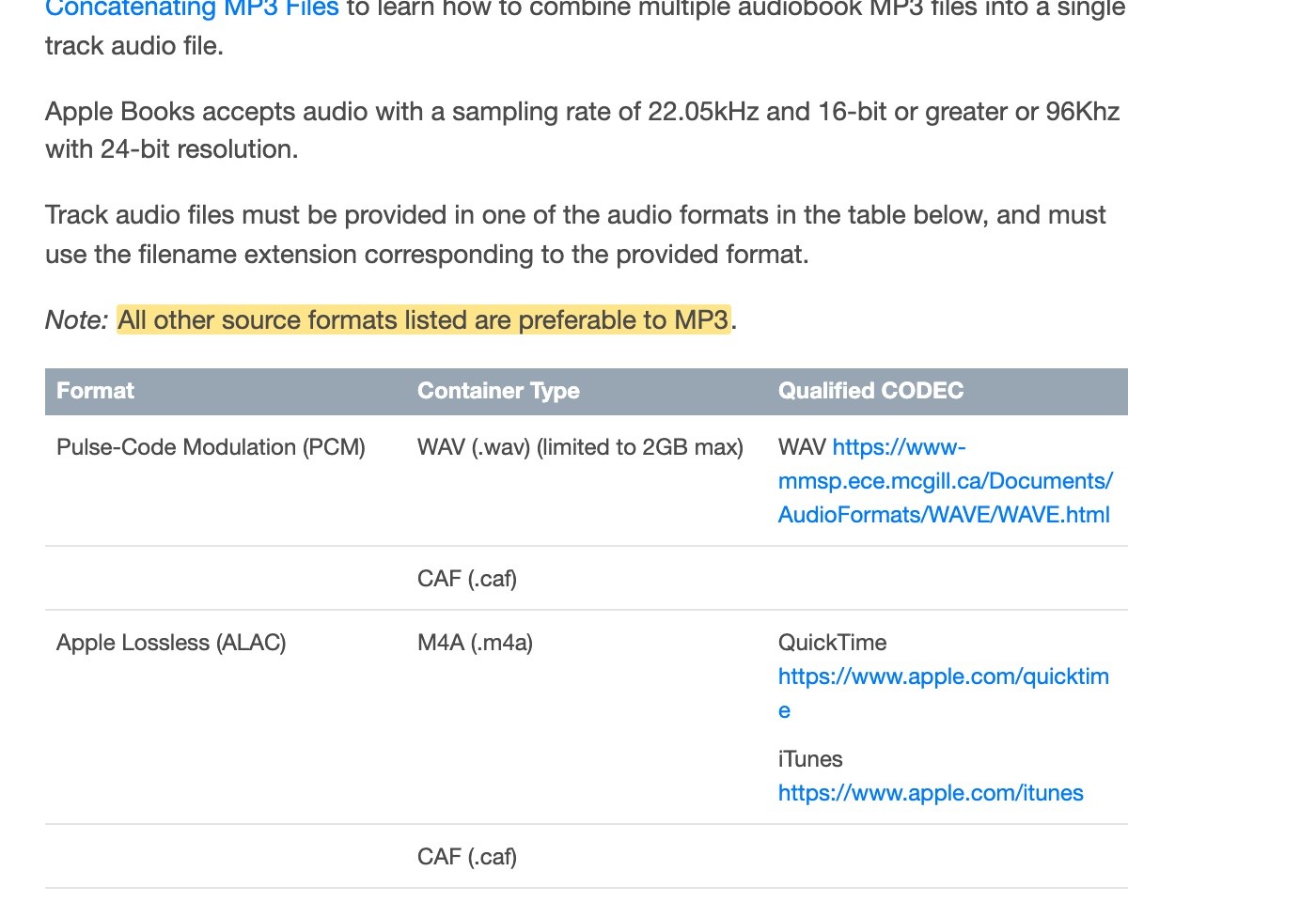
| Apple Books (via a distributor) | WAV, AAC, ALAC, FLAC or MP3 | Apple prefers anything over MP3 |
| Kobo | MP3 only | 200 MB per file, 2 GB in total |
| Author’s Republic | MP3 | 192 kbps CBR, 44.1 kHz; files 119 minutes or less |
| PublishDrive | MP3 or M4B | 192 kbps or more, CBR, 44.1 kHz; files 78 minutes or less |
MP3 is the safe choice for every store. Even Apple, which prefers lossless formats, accepts MP3, and your distributor will usually ask for MP3 anyway.
Apple is the one store that prefers something else. Its spec lists WAV, ALAC, AAC and FLAC and adds: “All other source formats listed are preferable to MP3.” If your distributor can take lossless files for Apple, send them. Most self-published audiobooks still go to Apple as MP3 without trouble.
PublishDrive is the rare distributor that takes M4B uploads.
Kobo compresses most audio to 64 kbps when it arrives, so a higher bit rate doesn’t change what Kobo listeners hear. It does matter for the other stores, so export once at 192 kbps and use the same files everywhere.
The specs your files need
Format is only half of it. Stores also check how your audio sounds. ACX’s rules are the strictest, so files that pass ACX pass everywhere:
- Bit rate: 192 kbps or higher, constant bit rate (CBR), not variable.
- Sample rate: 44.1 kHz.
- Channels: all mono or all stereo, never mixed. Mono is fine for narration.
- Loudness: between −23 dB and −18 dB RMS. Spotify accepts a wider −24 to −14 dB.
- Peaks: no higher than −3 dB.
- Noise floor: no higher than −60 dB RMS (the quiet between words).
- Room tone: a little silence at the start and end of each file. Spotify asks for 0.5 to 1 second at the start and 1 to 5 seconds at the end.
- File length: 120 minutes or less per file on ACX, 2 hours on Spotify, 78 minutes on PublishDrive.
- One chapter per file, with the chapter title read at the start.
If a store rejects your files, it’s usually loudness, not format. Our guide to how to make an audiobook covers checking the audio before you upload.
What about WAV and FLAC?
WAV and FLAC are lossless: they keep every detail of the recording. They’re what studios master in, and Spotify, Google and Apple accept them. They’re also several times bigger than MP3, and ACX and Kobo don’t take them. Keep lossless masters if you recorded your own audiobook, and export MP3s from them.
Which format should you use?
- Uploading to stores or a distributor: MP3, one per chapter, at the specs above.
- Selling on your own site: offer both. A ZIP of chapter MP3s plays on anything. An M4B is one tidy file for listeners with an audiobook app. On Gumroad, upload the MP3s as separate files rather than a ZIP if you want them to play in its app.
- Sending review copies: BookFunnel only takes MP3s, at 192 kbps or more, and joins them into one audiobook for your readers.
- Your own listening and backups: M4B, because it keeps the whole book, its chapters and cover in one file.
An AI audiobook generator like Audiobook Generator gives you both from one export: a 192 kbps MP3 for every chapter, opening and closing credits, and a single M4B with chapter marks, all levelled to audio-store loudness.
FAQ
What file format do audiobooks use?
Stores use MP3, usually one file per chapter at 192 kbps. For listening, many audiobook apps use M4B, a single file with chapter marks.
Is M4B better than MP3?
For listeners, often yes: one file, chapter marks, bookmarks, and better sound for its size. For stores, no: almost all of them only accept MP3.
Can I upload an M4B to Audible?
No. ACX only accepts MP3 files, one per chapter, at 192 kbps or more.
Does Apple Books accept M4B?
Apple’s spec asks for a single audio track with chapter markers, in AAC, ALAC, FLAC, WAV or MP3, delivered through a distributor. Your distributor decides what you upload. PublishDrive takes M4B; most others ask for MP3.
What bit rate should audiobook MP3s be?
192 kbps, constant bit rate, 44.1 kHz. It’s what ACX requires and what most other stores recommend.
Should audiobooks be mono or stereo?
Either, as long as every file is the same. Mono suits narration and makes smaller files. Stereo is worth it if you add music or sound effects.
Ready to make your audiobook?
Upload your manuscript and you’ll get store-ready MP3s and an M4B from the same export, checked against audio-store specs.
Philip Ghezelbash is the founder of Audiobook Generator and the author of The Stoic Body, which has sold over 10,000 copies on Amazon. He writes about making, publishing and selling audiobooks.
Keep reading

How Many Words Per Hour Is an Audiobook?
The standard figure, a calculator for your own word count, typical lengths by genre, and why the number matters for price and cost.
Philip Ghezelbash··5 min read
Do Audiobooks Need an ISBN?
Which stores ask for an ISBN, which give you one free, what one costs, and when it’s worth buying your own.
Philip Ghezelbash··6 min read
What Size Should an Audiobook Cover Be?
The one size that works everywhere, each store’s rules, and how to turn your ebook cover into a square that still reads at thumbnail size.
Philip Ghezelbash··4 min read