What Size Should an Audiobook Cover Be?
The one size that works everywhere, each store’s rules, and how to turn your ebook cover into a square that still reads at thumbnail size.

In this article
Audiobook covers trip up a lot of authors, because they aren’t the shape of a book. Every store wants a square, and each has its own minimum size.
Make your audiobook cover 3000 × 3000 pixels: a perfect square, saved as a JPEG in RGB colour, under 5 MB. That meets Apple’s minimum, which is the highest, and passes every other store too. Below are each store’s exact rules (checked October 2026), what you can’t put on a cover, and how to turn a tall ebook cover into a square one.
Audiobook cover size by store
| Store | Minimum size | Format | Other rules |
|---|---|---|---|
| Apple Books | 3000 × 3000 px | JPEG or PNG | RGB only; larger is recommended |
| Spotify | 3000 × 3000 px recommended | PNG or JPEG | Square, no borders; PNG at 300 dpi preferred |
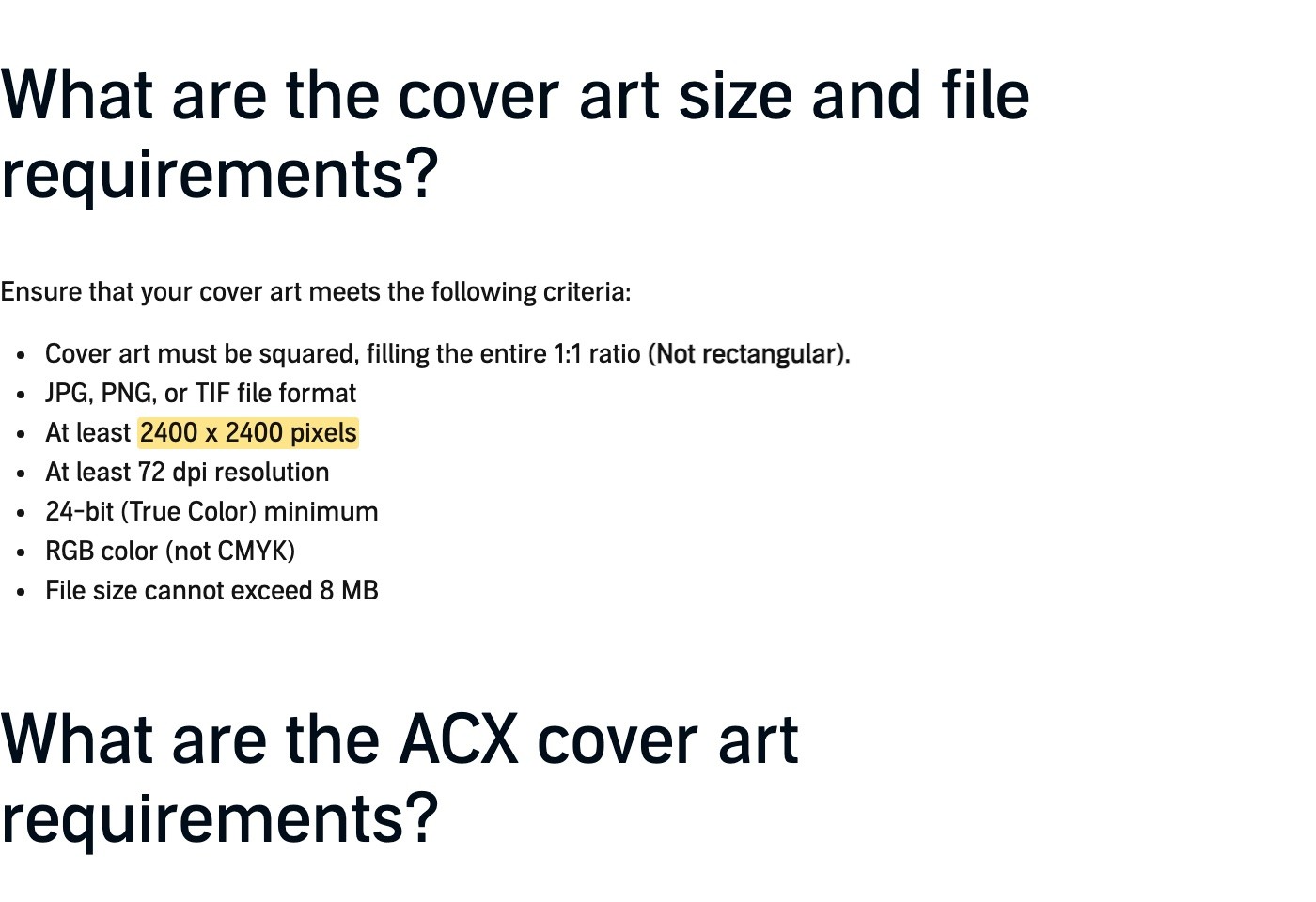
| Audible (ACX) | 2400 × 2400 px | JPG, PNG or TIF | RGB, 72 dpi or more, 8 MB or less |
| Voices by INaudio | 2400 × 2400 px | PNG, TIF or JPG | No borders, no 3D or book images |
| Author’s Republic | 2400 × 2400 px | JPG | RGB, 72 dpi or more |
| PublishDrive | 1400 × 1400 px | JPG | RGB, 72 dpi or more |
| Google Play Books | 1,024 px (up to 7,200) | PNG or JPG | Square recommended |
| Kobo | 600 × 600 px recommended | PNG or JPG | Square; 5 MB or less |
The highest minimum is Apple’s 3000 × 3000. Make your cover that size and you never need a second version.
ACX’s minimum is lower, but its other rules are stricter:
The settings to export with
- Size: 3000 × 3000 pixels.
- Shape: exactly square, the same number of pixels each way.
- Format: JPEG, at high quality. PNG works too, but it’s often too large for Kobo’s 5 MB limit.
- Colour: RGB. Print covers are often CMYK, which Apple and ACX refuse.
- Resolution: 72 dpi or more. Pixels are what count; 300 dpi doesn’t hurt.
- File size: under 5 MB, which fits every store.
What you can’t put on an audiobook cover
ACX has the most rules, and following them keeps you safe everywhere. Your cover can’t include:
- Prices or running times. Stores show these themselves, and they change.
- Barcodes or QR codes.
- Audible or Amazon branding, or anything that looks like it.
- A photo or 3D mock-up of a book. Voices by INaudio bans 3D and book images too.
- Borders or letterboxing. Spotify and Voices by INaudio both ask for none.
It should include your title and author name, readable at small sizes. You don’t need to put “AI narrated” on the cover: the narrator credit and description carry that.
How to turn your ebook cover into a square
Your ebook cover is probably tall, about 1:1.6. You can’t just stretch it to a square. Here are three ways, from best to quickest:
- Ask your designer for an audio version. Most cover designers offer a square edit for a small fee. It’s the best result, because they can move the title and artwork to fit.
- Rebuild it yourself. Put the artwork on a square canvas, extend the background, and move the title and author so they fill the width.
- Place the tall cover on a square background. Centre it on a matching colour or a blurred copy of the artwork. It works in a pinch, but the title ends up small.
Whatever you do, check it at thumbnail size. On a phone, your cover may show at about the size of a fingertip. If you can’t read the title at 100 pixels wide, make it bigger.
An AI audiobook generator can handle this step for you. Audiobook Generator makes a 3000 × 3000 square from the cover you upload and keeps it under ACX’s 8 MB limit, so it’s ready for every store.
FAQ
What size is an audiobook cover?
3000 × 3000 pixels works for every store. The minimums range from 600 pixels (Kobo) to 3000 pixels (Apple), and ACX asks for at least 2400 × 2400.
What size cover does ACX need?
At least 2400 × 2400 pixels, square, RGB, 72 dpi or more, in JPG, PNG or TIF, and no bigger than 8 MB.
Can I use my ebook cover for my audiobook?
Not as it is, because ebook covers are tall and audiobook covers are square. Make a square version with the same design.
Should an audiobook cover be JPEG or PNG?
JPEG is the safest choice. Every store accepts it, and it stays under size limits more easily than PNG.
Does my cover need to say it’s an audiobook?
No. Stores show the format themselves. Some authors add a small “audiobook” badge, but it isn’t required, and ACX doesn’t allow anything that looks like Audible branding.
What dpi should an audiobook cover be?
At least 72 dpi. Stores care about pixels, not dpi, so a 3000 × 3000 image is fine at any dpi.
Ready to make your audiobook?
Upload your manuscript and cover, and you’ll get store-ready files with the square cover made for you.
Philip Ghezelbash is the founder of Audiobook Generator and the author of The Stoic Body, which has sold over 10,000 copies on Amazon. He writes about making, publishing and selling audiobooks.
Keep reading

How Many Words Per Hour Is an Audiobook?
The standard figure, a calculator for your own word count, typical lengths by genre, and why the number matters for price and cost.
Philip Ghezelbash··5 min read
Do Audiobooks Need an ISBN?
Which stores ask for an ISBN, which give you one free, what one costs, and when it’s worth buying your own.
Philip Ghezelbash··6 min read
Audiobook File Formats: MP3 vs M4B and Which to Use
What MP3 and M4B are, which one each store accepts, and the exact specs your audiobook files need to pass.
Philip Ghezelbash··6 min read